

Technology

Internet Acronyms
An acronym is a word or name formed as an abbreviation from the initial components in a phrase or a word, usually individual letters PAP “Pee-pees and pee-pees” (new term for sausage fest) “Please ask pop” “Pap smear” “Paparazzi” “Pies are perfect” IDEK “I did everything, k?” “I don’t ever know” IKR “I keep it real” “I know (the) reason” OOTD

Hijacked Computer: What to Do
Your computer’s been hijacked by malware — how do you get it back? You can’t turn your computer on or off. It’s acting up, running slow, opening pages you didn’t click, displaying pop-ups constantly. There’s a good chance your computer’s been hacked or infected with a virus and needs your help. Stop shopping, banking, and

Hacked Email: What to Do
Your email’s been hacked — what do you do? Your friends and family are getting e-mails from you that you didn’t send. Or maybe you want to check your e-mail, but wait, you can’t login. Sound familiar? Chances are your e-mail’s been hacked. Don’t panic. The situation can be fixed. Start by updating or installing

Help Prevent Cyberbullying
Cyberbullying is bullying or harassment that happens online. It can happen in an email, a text message, a game, or on a social networking site. It might involve spreading rumors or images posted on someone’s profile or passed around for others to see, or creating a group or page to make a person feel left

Protect Your Computer from Malware
Malware is short for “malicious software.” It includes viruses and spyware that get installed on your computer or mobile device without your consent. These programs can cause your device to crash and can be used to monitor and control your online activity. Would it surprise you to learn that millions of computers in the US
Tech Help: Tips & Tricks
Keyboard shortcuts Copy and Paste – to copy and paste using keyboard, Highlight what you want to copy and at the sametime, use keys below; Ctrl and C to Copy Ctrl and V to Paste Ctrl and A to Copy All Text Opening a Web page in a new window (Windows OS)

Tips for Using Public Wi-Fi Networks
Wi-Fi hotspots in coffee shops, libraries, airports, hotels, universities, and other public places are convenient, but often they’re not secure. If you connect to a Wi-Fi network, and send information through websites or mobile apps, it might be accessed by someone else. To protect your information when using wireless hotspots, send information only to
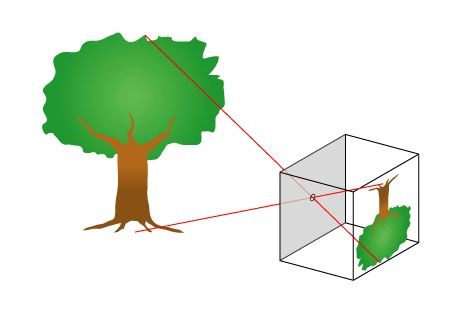
How to Make and Use a Pinhole Camera
By using common household materials, you can make a camera that will produce pictures. Making and using a pinhole camera will acquaint you with the basic elements of photography while providing an inexpensive and interesting way to take pictures. This bulletin explains how to make and use two types of pinhole cameras-a cartridge pinhole camera